TACHYGRAPHE SIMPLE POUR ETS2/ATS V1.7 MOD
A simple tachograph that considers “driving time” (daily, weekly and two-weeks) and “rest time”.
Version 1.7 – added voice notification of the remaining driving time when displaying tachograph information in the game console
If the speed is more than 1 km/h, then driving time is considered, otherwise rest time is considered.
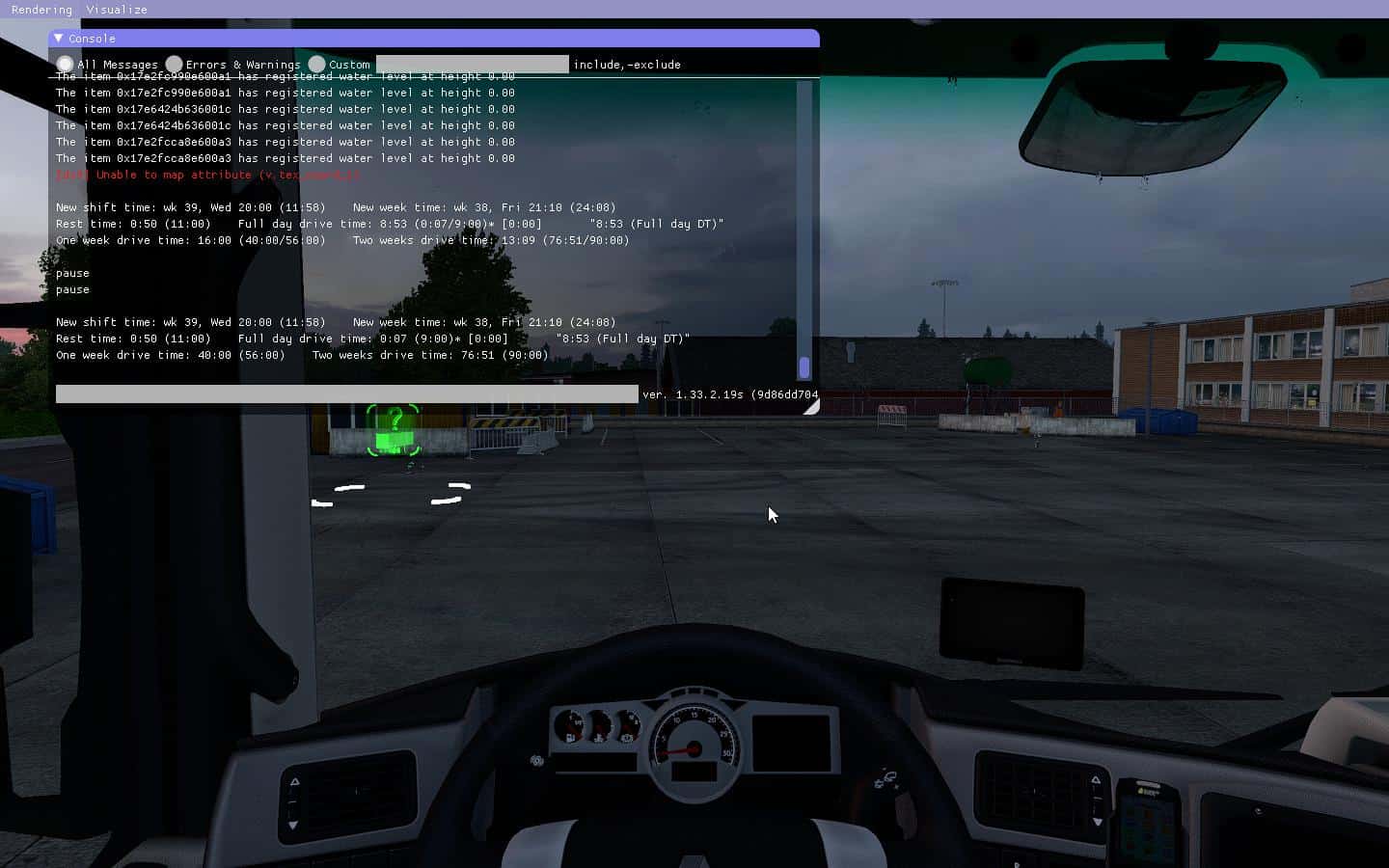
During the game, you can press the hotkey to display the tachograph information in the game console
(the default is the F12 key).
Dans les réglages du programme, vous pouvez définir les paramètres suivants (en minutes) :
- la durée totale maximale de conduite journalière ;
- la durée maximale hebdomadaire totale de conduite ;
- la durée totale maximale de conduite de deux semaines ;
- le temps de repos continu minimum par jour ;
- le temps de repos continu minimum par semaine.
En outre, vous pouvez assigner une touche de raccourci pour afficher les informations du tachygraphe dans la console de jeu.
After a week’s rest, the time of driving for a week is first copied into the driving for the second week,
and then resets. In addition, the current playing time is remembered – this is the time of the beginning
of a new working week (it is shown in the console as “New week time”).
Over 1 hour and 20 minutes before the end of driving time (daily, weekly or two-weeks), the player is
notified (sound and in the game console) at intervals of every 20 game minutes.
“Rest time”, if it is more than 20 minutes, can be interrupted by “driving”, amounting to no more
than 60 minutes. If the “driving” exceeds these 60 minutes, then the “rest time” and the “driving after a pause”
counter will be reset. The amount of driving time after a pause of 20 minutes is indicated in square brackets
after the “Full day drive time”. This interruption of the “rest time” was done in order not to lose
the “rest time” spent on the ferry.
The remaining time for work, displayed in quotes in the line Full day drive time, is calculated for all indicators:
daily, weekly and two-week driving time, as well as the start time of the new shift and/or new week.
Then the minimum is taken and it is displayed on the screen. In brackets indicates what it refers to:
- (journée complète DT) - pour le temps de conduite quotidien
- (Une semaine DT) - pour le temps de conduite hebdomadaire
- (Deux semaines DT) - pour une durée de conduite de deux semaines
- (Fin de poste) - pour la fin de poste (jour ouvrable)
- (Fin de semaine) - pour la fin de la semaine de travail
If the “Show remaining time” checkbox is checked, the “driving time” shown in the console has the following
format: (/). If the checkbox is not checked, then everything remains as it was
before: (). For the new shift, the new week and the “rest time” in the brackets is always
indicated the remaining time.
RECOMMENDATIONS
——————-
* Je recommande de désactiver l'émulation de fatigue par défaut.
* Le programme peut être minimisé dans la barre d'état système, afin de ne pas interférer avec l'écran.