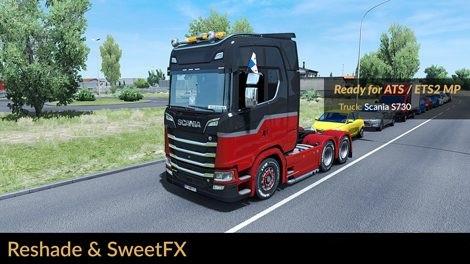
REALISTIC LIGHTING 2 JBX – PRESET V1.9.7 (RESHADE AND SWEETFX) MOD
Description: The custom setting v1.9.7 offers the best visual of the gaming environment for most games, without affecting the quality of lighting and colors. The excess of brightness, bad contrast and pure white is eliminated for more realistic graphics, compatibility with many Games and Mod Graphics.
Recommendation: Avoid modifying the default brightness and contrast of the monitor*, play in Full HD (1920X1080) or higher and use the graphics settings that I recommend to get the best possible result in the game.
Additional: Deactivate the graphic options of post-processing effects and any other adjustment that affects the quality of the environment, including anti-aliasing filter not recommended. The brightness or gamma settings must be by default in the games. in some games you have to adjust it to avoid excess brightness.
Caracteristici:
– Better Lighting
– Better Color
– Better Contrast
– No Pure White
– Sharpness and Focus
– Better Color Temperature
Changelog:
v1.9.7: Adjustments and Improvements in Curves, DPX, LiftGammaGain and Tonemap. All the previous reshade files must be replaced by the new version. including the folder (reshade-shaders).
Culoare mai bună
Contrast mai bun
Less Brightness
Important: Always use the modified file DPX.h (SweetFX v2.0) for the correct visual of the effect. Replace existing file
Path: SweetFXShadersDPX.h
#####
Ajustări necesare* în cadrul jocului
– Anti-Aliasing (MLAA): OFF (*)
– High Dynamic Range: ON (*)
– Depth of Field (DOF): OFF (*)
– Rays of Sunshine: ON (*)
– Color Correction: ON (*)
– Anisotropic Filtering: Maximum (*)
Vă recomand să jucați în cea mai bună calitate grafică + 400% Scaling + Full HD
Pentru o calitate vizuală mai bună, aplicați toate setările grafice recomandate de mine. Aceasta afectează performanța*
#####
Necessary settings for my Mod JBX 2 (SCS) and Preset v1.9.7 (Config.cfg)
uset r_gamma “1” (Important)
uset r_cloud_shadows “0” (Optional)
uset r_color_correction “1” (Important)
Path: DocumentsAmerican Truck Simulatorconfig.cfg
Path: DocumentsEuro Truck Simulator 2config.cfg
#####
Notă: Ieșiți din joc înainte de a modifica config.cfg
#####
Warning: If you want to use any of my configurations, request it and leave my credit. JuanBonX
Compatible: Con la mayoría de los juegos – With most games
****
Disable FXAA for Other Games (Important)